About
Multi-modal campaigns provide a comprehensive communication approach by combining voice calls with SMS messaging capabilities. These campaigns enable you to send pre-call notifications, conduct AI-powered phone conversations, and follow up with targeted post-call messages based on call outcomes.Multi-modal campaigns include all single-modal campaign features plus advanced messaging capabilities. For voice-only campaigns, consider Single-Modal Campaigns.
What Makes It Multi-Modal?
Multi-modal campaigns extend voice interactions with messaging at multiple touchpoints:Complete Communication Journey
- 🔔 Pre-call SMS notifications
- 📞 AI-powered voice calls
- 📨 Outcome-based follow-up messages
- 📊 Enhanced tracking and analytics
Key Advantages
Enhanced Engagement
Enhanced Engagement
- Higher connection rates: Pre-call SMS increases answer rates
- Better preparation: Recipients expect and prepare for calls
- Continued engagement: Post-call messages maintain connection
- Flexible communication: Accommodates different preferences
Comprehensive Follow-up
- Call answered: Confirmation and next steps
- Missed calls: Reschedule options and information
- Declined calls: Alternative contact methods
- Technical issues: Support and retry information
Advanced Workflow Management
- Conditional messaging: Different messages for different outcomes
- Dynamic variables: Personalized content throughout journey
- Timing control: Precise scheduling for optimal engagement
- Multi-channel tracking: Complete customer journey visibility
When to Use Multi-Modal Campaigns
Perfect Use Cases
Appointment Management
- Medical appointment reminders with confirmation
- Service appointments with preparation instructions
- Meeting scheduling with agenda sharing
Customer Engagement
- Customer surveys with follow-up resources
- Sales outreach with information sharing
- Support follow-up with documentation
Complex Workflows
- Multi-step customer journeys
- Conditional communication paths
- Document or link sharing requirements
Enhanced Compliance
- Regulated industries requiring documentation
- Confirmation requirements
- Audit trail maintenance
Creating Your Multi-Modal Campaign
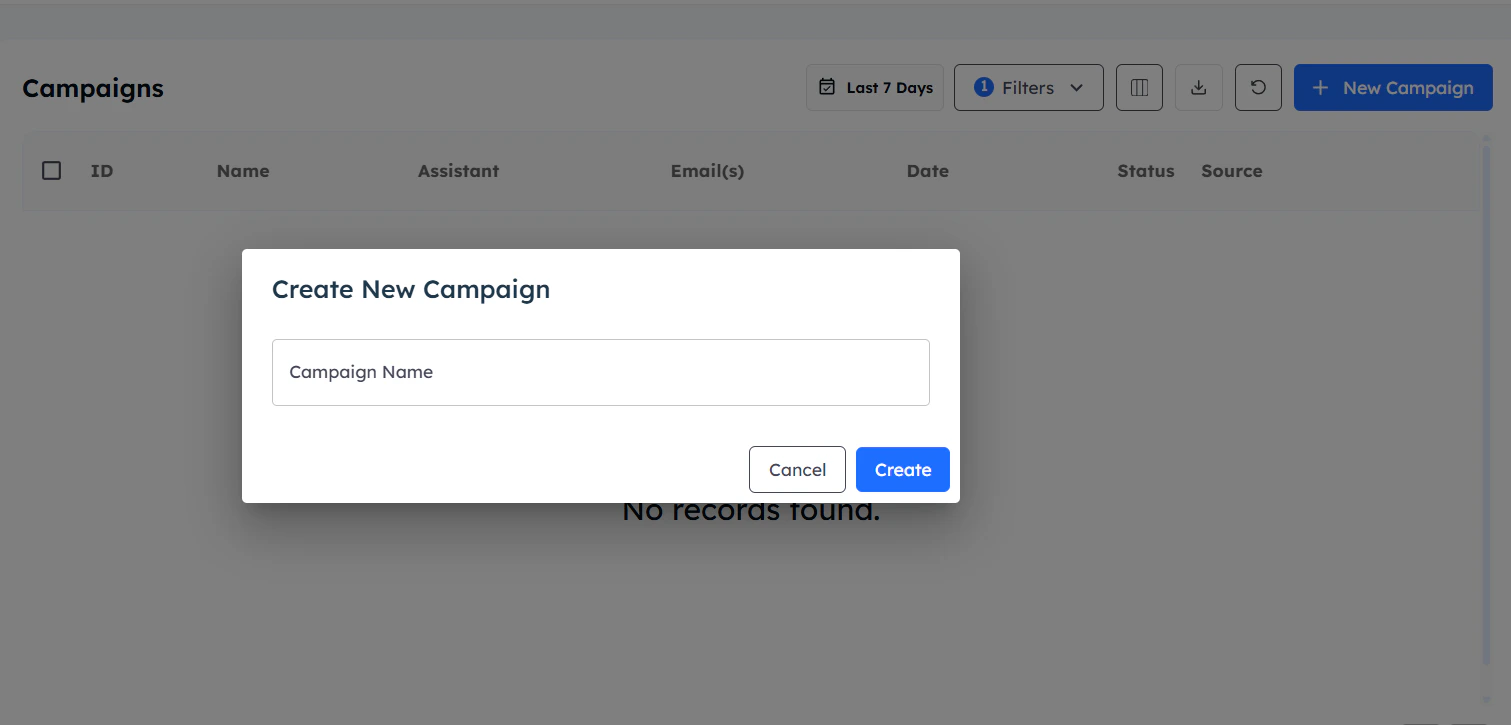
Access Campaign Dashboard
- Navigate to your Interactly dashboard
- Click the Campaigns tab
- Select New Campaign to begin

Name and Configure
- Provide a descriptive campaign name
- Click Create to proceed
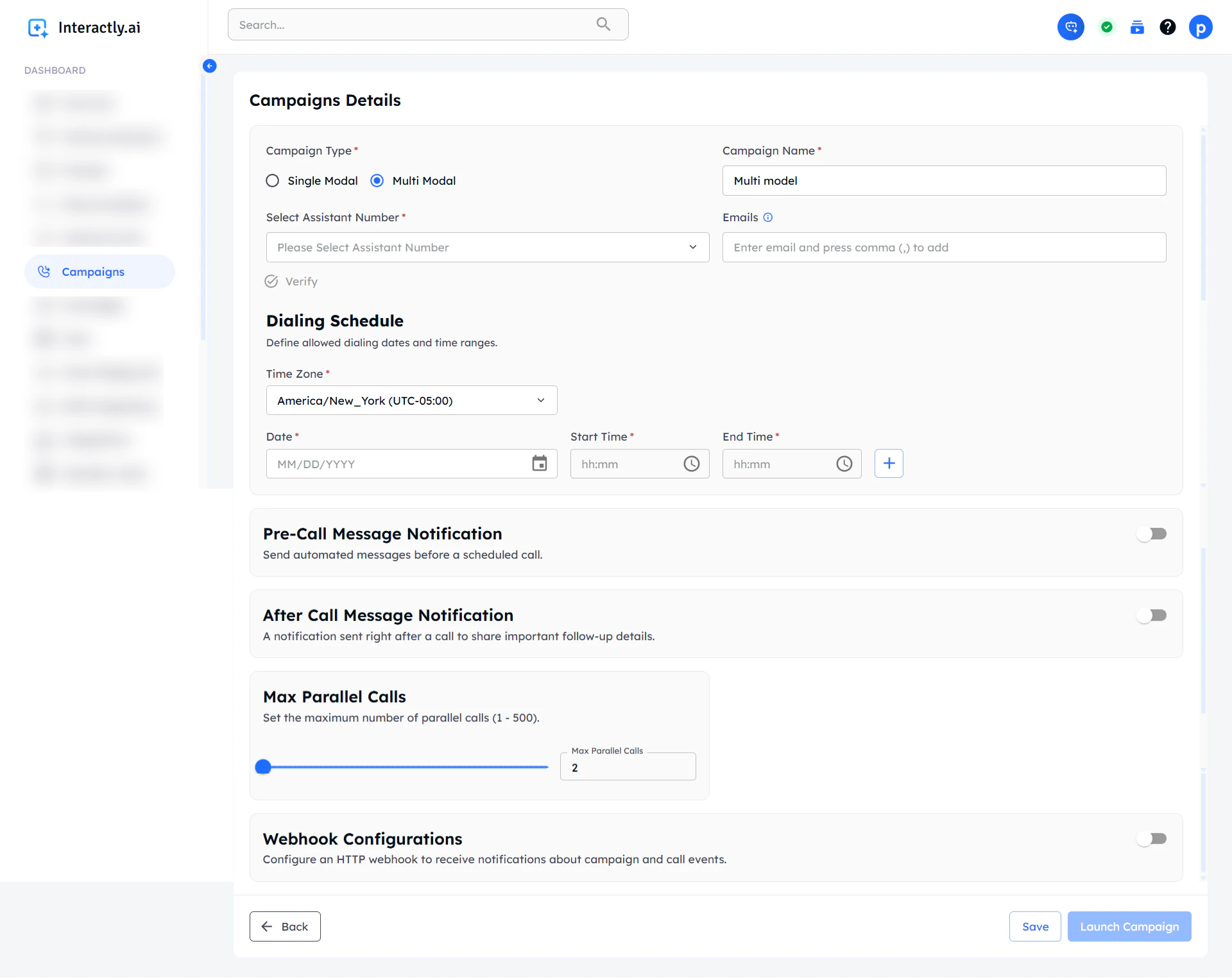
- You’ll be redirected to the configuration page

Pre-Call Message Configuration
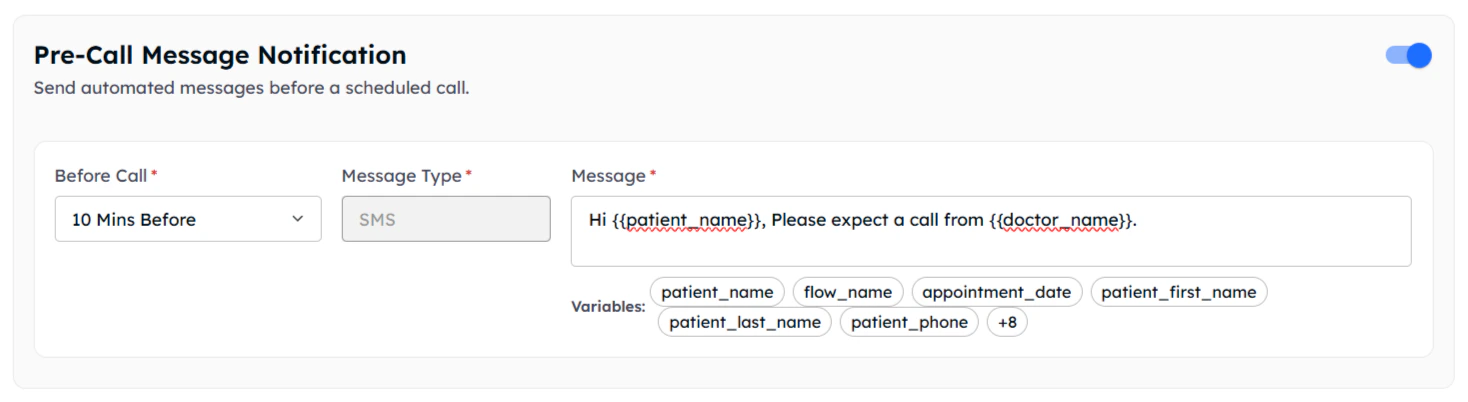
Pre-call messages notify recipients about upcoming calls, improving answer rates and call preparation.Enable Pre-Call Notifications
Enable Pre-Call Notifications
Before Call Settings:Message Configuration:
Example Pre-Call Message:
Timing Configuration
- Default: 10 minutes before call
- Custom timing: Set any duration (minimum 10 minutes)
- Flexible scheduling: Align with your workflow needs
Message Type
SMS (Default)
- Currently supported message type
- Direct delivery to mobile phones
- High open and read rates
Dynamic Content
Personalization
- Use campaign assistant variables
- Click variables to copy them
- Personalize each message

Post-Call Message Configuration
Post-call messages provide targeted follow-up based on specific call outcomes, ensuring continued engagement regardless of call results.Configure different messages for each possible call outcome to maintain engagement and provide appropriate next steps.
Call Outcome Messaging
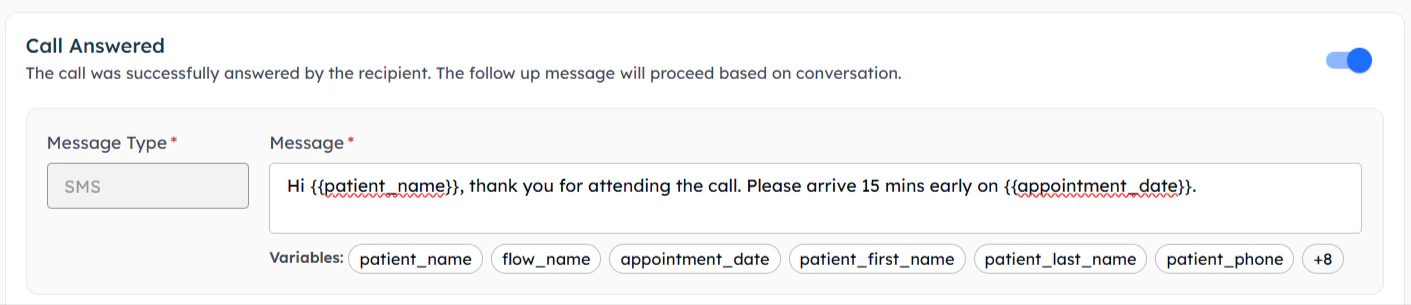
Call Answered
Call Answered
When the recipient successfully answers the call:
Example Message:

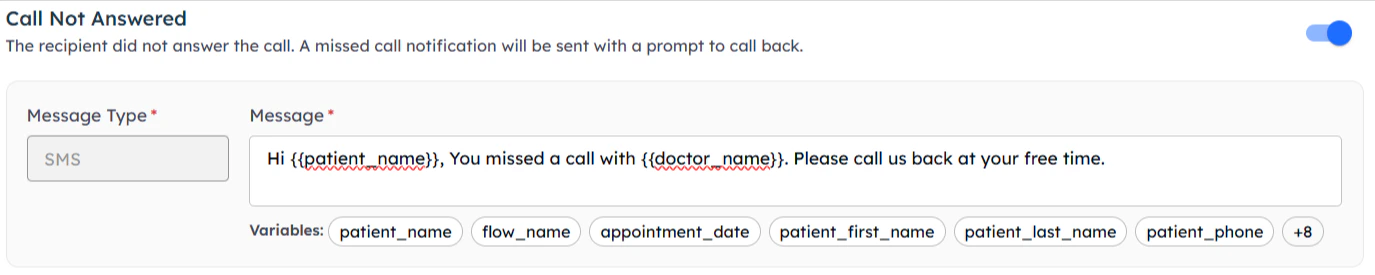
Call Not Answered
Call Not Answered
When the call goes unanswered:
Example Message:
Missed Call Strategy
- Inform about the missed call
- Provide callback information
- Offer alternative contact methods
- Include important information they missed

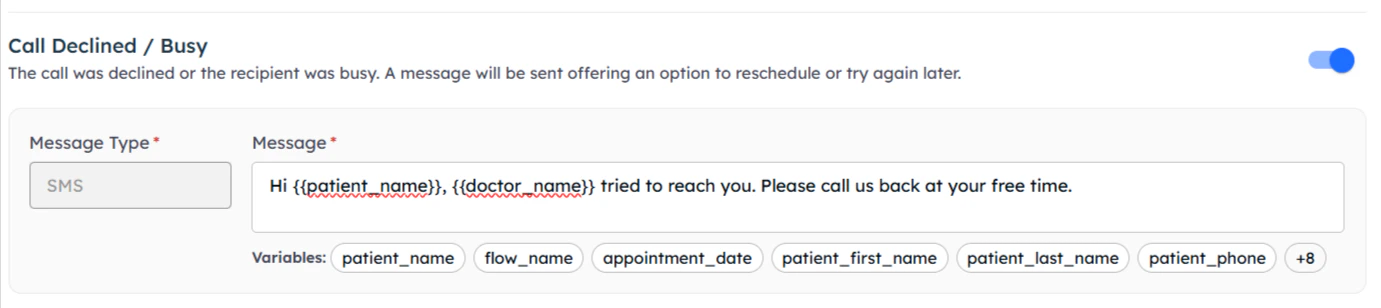
Call Declined / Busy
When the call is declined or recipient is busy:
Example Message:
Respectful Follow-up
- Acknowledge their unavailability
- Offer rescheduling options
- Provide alternative contact methods
- Maintain professional tone

Additional Call Outcomes
Voicemail Left
Voicemail Left
When a voicemail is left for the recipient:
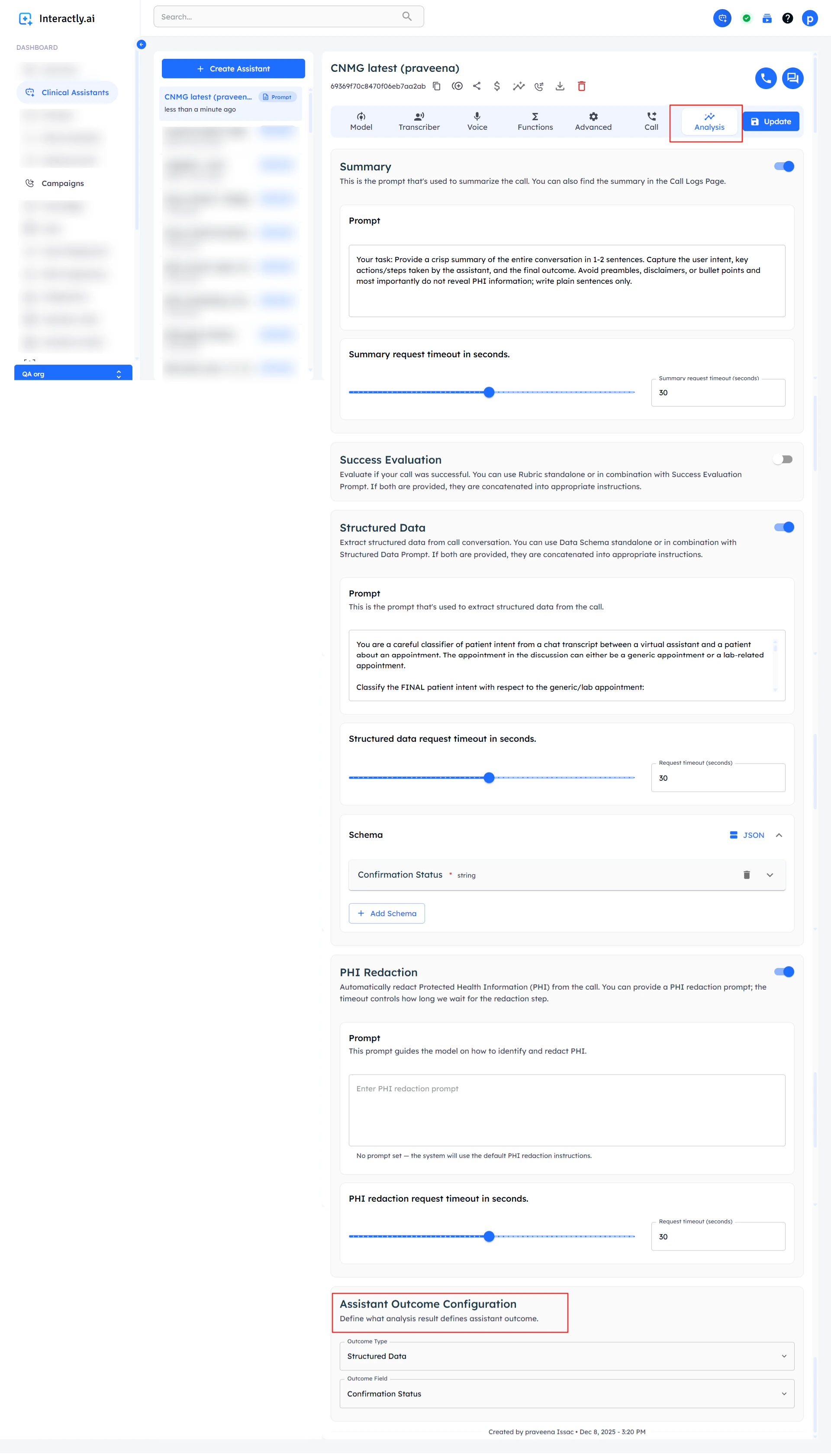
Configure Assistant Analysis
Set up voicemail detection in your AI assistant:
- Go to your campaign’s AI assistant settings
- Open the “Analysis” tab
- Configure “Outcome Type” and “Outcome Field”

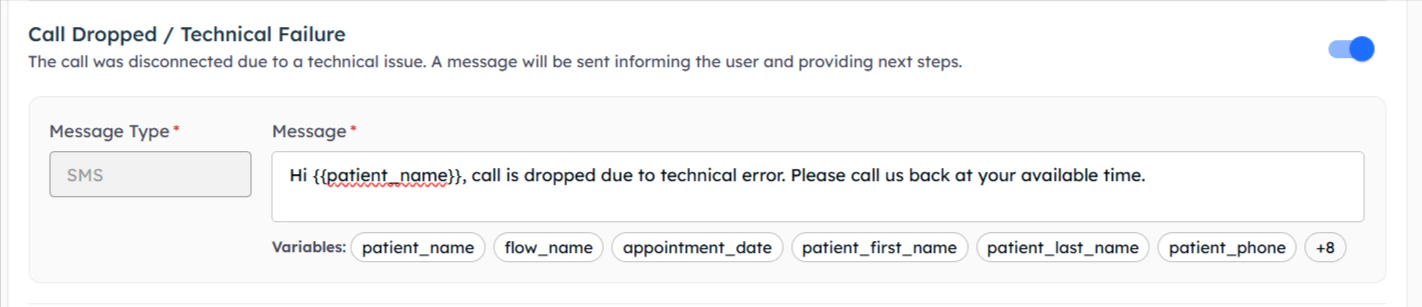
Call Dropped / Technical Failure
When technical issues interrupt the call:
Example Message:
Technical Issue Response
- Acknowledge the technical problem
- Apologize for the inconvenience
- Provide alternative contact methods
- Offer to retry the call

Campaign Configuration & Launch
Multi-modal campaigns include all the configuration options available in single-modal campaigns, plus the messaging features detailed above.
Standard Configuration
Multi-modal campaigns inherit all single-modal campaign features:Assistant Selection
Choose your AI assistant for voice conversations
Scheduling
Set date, time, and timezone for campaign execution
Contact Management
Upload contacts with required fields for both voice and SMS
Notifications
Configure email notifications for campaign status
Enhanced Contact Requirements
For multi-modal campaigns, ensure your contact data includes:Required Fields
- phone_number: Primary contact number for voice calls
- SMS-compatible number: Ensure numbers can receive SMS
Variable Fields
- Voice prompt variables: For AI conversation personalization
- SMS message variables: For pre and post-call message personalization
- Contact information: Names, preferences, relevant context
Best Practices for Multi-Modal Campaigns
Message Timing
Message Timing
- Pre-call timing: 10-30 minutes for appointments, 2-24 hours for general outreach
- Post-call immediacy: Send within 5 minutes of call completion
- Business hours: Respect SMS timing preferences and regulations
Message Content
Message Content
- Clear and concise: SMS has character limits, be direct
- Personalization: Use dynamic variables for relevant content
- Call-to-action: Include clear next steps in every message
- Professional tone: Maintain consistent brand voice across channels
Compliance Considerations
- Opt-in requirements: Ensure SMS consent where required
- Unsubscribe options: Include opt-out instructions
- Time restrictions: Follow local SMS timing regulations
- Record keeping: Maintain logs for compliance auditing
Monitoring Multi-Modal Performance
Enhanced Analytics
Multi-modal campaigns provide comprehensive tracking:
- Pre-call SMS delivery rates
- Call answer rates (with/without pre-call SMS)
- Post-call message engagement
- Complete customer journey tracking
- Outcome-based messaging effectiveness
Next Steps
Single-Modal Campaigns
Compare with voice-only campaign approach
Campaign Overview
Return to main campaigns documentation