

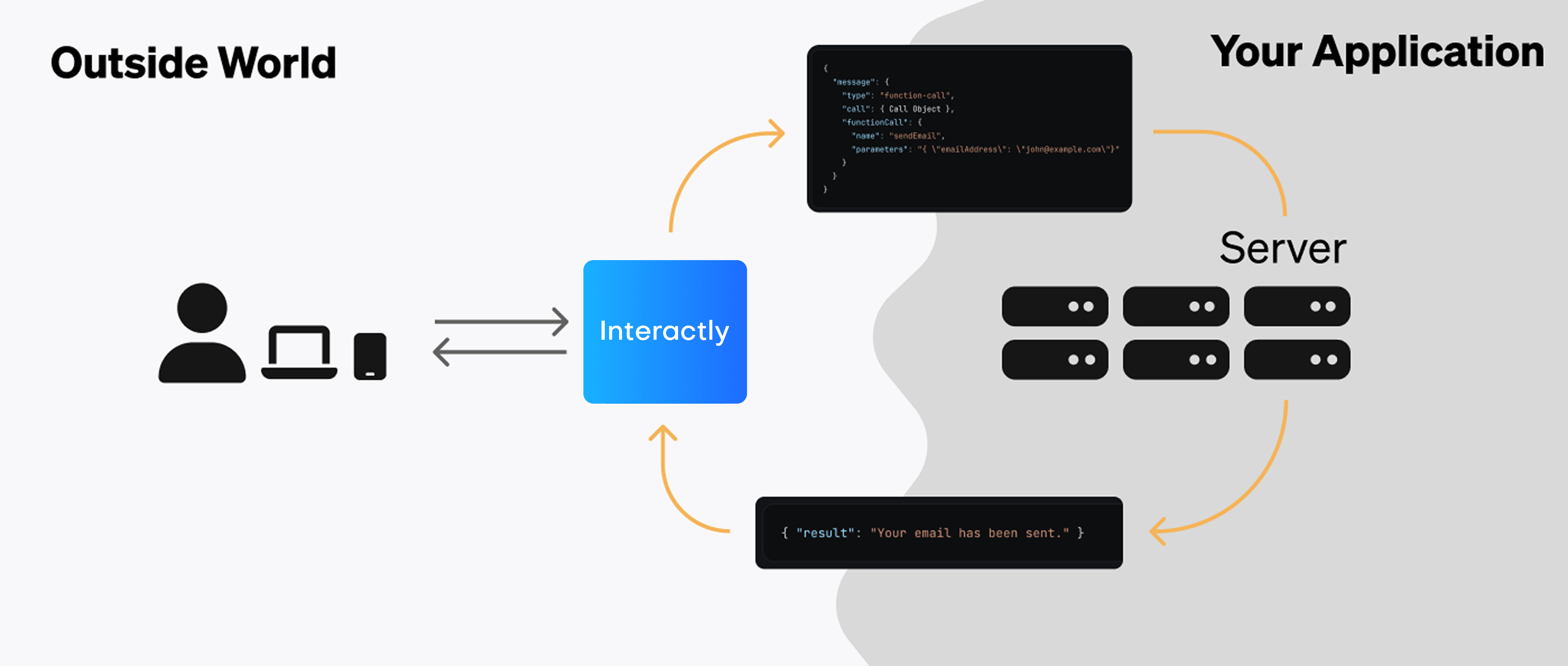
Server URLs give Interactly a location to send real-time conversation data (as well as query for data Interactly needs).
- Status Updates (status-update): updates on the status of a call
- Call Updates (conversation-update): updates on the messages of a call
- Hang Notifications (hang): get notified when your assistant fails to reply for a certain amount of time
- End of Call Report (end-of-call-report): call summary data at the end of a call
- Tool Calls: payloads delivered when your assistant wants certain actions executed
If you’re familiar with functional programming, Server URLs are like callback functions. But
instead of specifying a function to get data back on, we specify a URL to a server (to POST data back to).
Get Started
To get started using server URLs, read our guides:Setting Server URLs
Server URLs can be set in multiple places. Learn where here.
Events
Read about the different types of events Interactly can send to your server.
Developing Locally
Learn about receiving server events in your local development environment.
FAQ
Where can the server be located?
Where can the server be located?
The server URL can be any publicly accessible URL pointing to an HTTP endpoint. This can be a:
- Cloud Server: your application might be deployed on a cloud platform like Railway, AWS, GCP, etc — as a persistent web server.
- Serverless Function: services like Vercel, AWS Lambda, Google Cloud Functions, Cloudflare, etc — allow you to host on-demand cloud functions.
- Workflow Orchestrator: platforms like Pipedream & Make allow you to program workflows (often without code) that can receive events via HTTP triggers.
Why not just call them webhooks?
Why not just call them webhooks?
Webhooks are traditionally unidirectional & stateless, with the target endpoint usually only replying with a status code to acknowledge message reception. Certain server URL events (like assistant requests) may require a meaningful reply from your server.“Server URL” is a more general term that encompasses both webhooks & bidirectional communication.