> ## Documentation Index
> Fetch the complete documentation index at: https://docs.interactly.ai/llms.txt
> Use this file to discover all available pages before exploring further.
# Local Testing with ngrok
> Set up a local webhook server for testing Interactly events
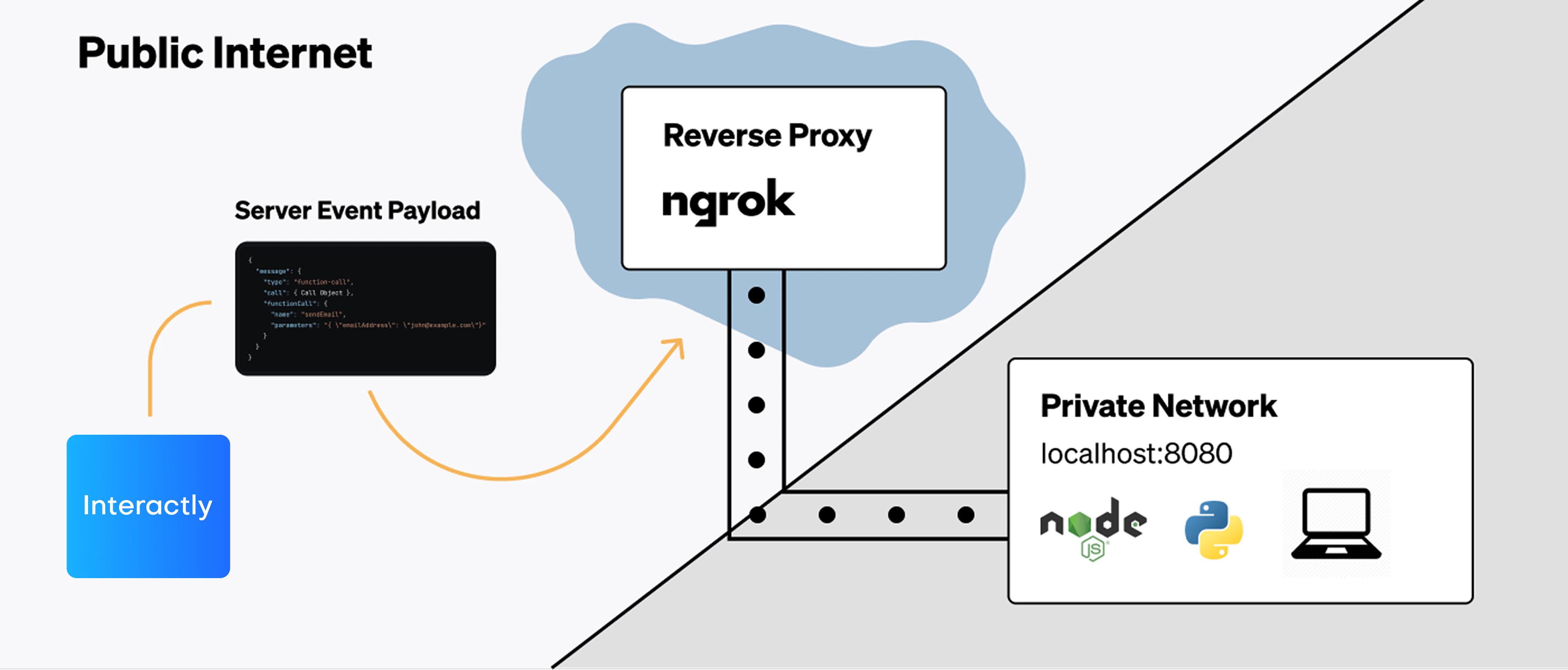
This guide shows you how to set up a local webhook testing environment using ngrok to receive and debug Interactly webhook events during development.
ngrok creates a secure tunnel to your local development server, making it accessible from the internet so Interactly can send webhook events to your local machine.
## Prerequisites
Before getting started, make sure you have:
* Python 3.7+ installed
* ngrok account and installation ([Download ngrok](https://ngrok.com/download))
* An Interactly assistant configured for testing
## Setup Overview
```mermaid theme={null}
graph LR
A[Interactly] --> B[ngrok Public URL]
B --> C[ngrok Tunnel]
C --> D[Local Python Server]
D --> E[Console Logs]
```
 ## Step 1: Install Dependencies
Create a new directory for your webhook testing server:
```bash Terminal theme={null}
mkdir interactly-webhook-test
cd interactly-webhook-test
# Create virtual environment (recommended)
python -m venv webhook-env
source webhook-env/bin/activate # On Windows: webhook-env\Scripts\activate
# Install required packages
pip install flask requests python-dotenv
```
```bash Alternative with requirements.txt theme={null}
# Create requirements.txt
echo "flask==2.3.3
requests==2.31.0
python-dotenv==1.0.0" > requirements.txt
# Install from requirements
pip install -r requirements.txt
```
## Step 2: Create the Webhook Server
Create a file named `webhook_server.py` with the following code:
```python webhook_server.py theme={null}
import json
import os
from datetime import datetime
from flask import Flask, request, jsonify
from dotenv import load_dotenv
# Load environment variables
load_dotenv()
app = Flask(__name__)
# Configuration
PORT = int(os.getenv('PORT', 5000))
SECRET = os.getenv('WEBHOOK_SECRET', '')
def log_event(event_type, data):
"""Log webhook event with timestamp"""
timestamp = datetime.now().strftime('%Y-%m-%d %H:%M:%S')
print(f"\n{'='*60}")
print(f"[{timestamp}] WEBHOOK EVENT: {event_type}")
print(f"{'='*60}")
print(json.dumps(data, indent=2))
print(f"{'='*60}\n")
def verify_webhook_secret(headers):
"""Verify webhook secret if configured"""
if not SECRET:
return True
received_secret = headers.get('x-interactly-secret', '')
if received_secret != SECRET:
print(f"❌ Secret verification failed!")
print(f"Expected: {SECRET}")
print(f"Received: {received_secret}")
return False
print("✅ Secret verification passed")
return True
@app.route('/webhook', methods=['POST'])
def handle_webhook():
"""Main webhook endpoint"""
try:
# Verify secret if configured
if not verify_webhook_secret(request.headers):
return jsonify({'error': 'Unauthorized'}), 401
# Parse JSON payload
data = request.get_json()
if not data:
return jsonify({'error': 'Invalid JSON'}), 400
# Extract event type
event_type = data.get('message', {}).get('type', 'unknown')
call_id = data.get('message', {}).get('call', {}).get('id', 'unknown')
# Log the event
log_event(event_type, data)
# Handle different event types
handle_event_by_type(event_type, data)
# Return success response
return jsonify({
'status': 'received',
'event_type': event_type,
'call_id': call_id,
'timestamp': datetime.now().isoformat()
}), 200
except Exception as e:
print(f"❌ Error processing webhook: {str(e)}")
return jsonify({'error': 'Internal server error'}), 500
def handle_event_by_type(event_type, data):
"""Handle specific event types with custom logic"""
call = data.get('message', {}).get('call', {})
if event_type == 'status-update':
status = call.get('status', 'unknown')
duration = call.get('assistantCallDuration', 0)
print(f"📞 Call Status: {status.upper()}")
if duration > 0:
print(f"⏱️ Duration: {duration/1000:.1f}s")
elif event_type == 'conversation-update':
messages = data.get('message', {}).get('messages', [])
if messages:
latest_msg = messages[-1]
role = latest_msg.get('role', 'unknown')
text = latest_msg.get('text', '')
print(f"💬 {role.title()}: {text}")
elif event_type == 'end-of-call-report':
analysis = data.get('message', {}).get('analysis', {})
summary = analysis.get('summary', 'No summary available')
success = analysis.get('successEvaluation', 'Unknown')
cost = call.get('cost', {}).get('totalCost', 0)
print(f"📋 Call Summary: {summary}")
print(f"✅ Success Rating: {success}")
print(f"💰 Total Cost: ${cost:.4f}")
elif event_type == 'hang':
print("⏳ Assistant response delayed (5+ seconds)")
elif event_type == 'error':
error = data.get('message', {}).get('error', {})
error_type = error.get('type', 'unknown')
error_code = error.get('code', 'unknown')
error_msg = error.get('message', 'No message')
print(f"🚨 Error Type: {error_type}")
print(f"🔍 Error Code: {error_code}")
print(f"📝 Message: {error_msg}")
@app.route('/health', methods=['GET'])
def health_check():
"""Health check endpoint"""
return jsonify({
'status': 'healthy',
'timestamp': datetime.now().isoformat(),
'server': 'Interactly Webhook Test Server'
})
@app.route('/', methods=['GET'])
def welcome():
"""Welcome page"""
return """
## Step 1: Install Dependencies
Create a new directory for your webhook testing server:
```bash Terminal theme={null}
mkdir interactly-webhook-test
cd interactly-webhook-test
# Create virtual environment (recommended)
python -m venv webhook-env
source webhook-env/bin/activate # On Windows: webhook-env\Scripts\activate
# Install required packages
pip install flask requests python-dotenv
```
```bash Alternative with requirements.txt theme={null}
# Create requirements.txt
echo "flask==2.3.3
requests==2.31.0
python-dotenv==1.0.0" > requirements.txt
# Install from requirements
pip install -r requirements.txt
```
## Step 2: Create the Webhook Server
Create a file named `webhook_server.py` with the following code:
```python webhook_server.py theme={null}
import json
import os
from datetime import datetime
from flask import Flask, request, jsonify
from dotenv import load_dotenv
# Load environment variables
load_dotenv()
app = Flask(__name__)
# Configuration
PORT = int(os.getenv('PORT', 5000))
SECRET = os.getenv('WEBHOOK_SECRET', '')
def log_event(event_type, data):
"""Log webhook event with timestamp"""
timestamp = datetime.now().strftime('%Y-%m-%d %H:%M:%S')
print(f"\n{'='*60}")
print(f"[{timestamp}] WEBHOOK EVENT: {event_type}")
print(f"{'='*60}")
print(json.dumps(data, indent=2))
print(f"{'='*60}\n")
def verify_webhook_secret(headers):
"""Verify webhook secret if configured"""
if not SECRET:
return True
received_secret = headers.get('x-interactly-secret', '')
if received_secret != SECRET:
print(f"❌ Secret verification failed!")
print(f"Expected: {SECRET}")
print(f"Received: {received_secret}")
return False
print("✅ Secret verification passed")
return True
@app.route('/webhook', methods=['POST'])
def handle_webhook():
"""Main webhook endpoint"""
try:
# Verify secret if configured
if not verify_webhook_secret(request.headers):
return jsonify({'error': 'Unauthorized'}), 401
# Parse JSON payload
data = request.get_json()
if not data:
return jsonify({'error': 'Invalid JSON'}), 400
# Extract event type
event_type = data.get('message', {}).get('type', 'unknown')
call_id = data.get('message', {}).get('call', {}).get('id', 'unknown')
# Log the event
log_event(event_type, data)
# Handle different event types
handle_event_by_type(event_type, data)
# Return success response
return jsonify({
'status': 'received',
'event_type': event_type,
'call_id': call_id,
'timestamp': datetime.now().isoformat()
}), 200
except Exception as e:
print(f"❌ Error processing webhook: {str(e)}")
return jsonify({'error': 'Internal server error'}), 500
def handle_event_by_type(event_type, data):
"""Handle specific event types with custom logic"""
call = data.get('message', {}).get('call', {})
if event_type == 'status-update':
status = call.get('status', 'unknown')
duration = call.get('assistantCallDuration', 0)
print(f"📞 Call Status: {status.upper()}")
if duration > 0:
print(f"⏱️ Duration: {duration/1000:.1f}s")
elif event_type == 'conversation-update':
messages = data.get('message', {}).get('messages', [])
if messages:
latest_msg = messages[-1]
role = latest_msg.get('role', 'unknown')
text = latest_msg.get('text', '')
print(f"💬 {role.title()}: {text}")
elif event_type == 'end-of-call-report':
analysis = data.get('message', {}).get('analysis', {})
summary = analysis.get('summary', 'No summary available')
success = analysis.get('successEvaluation', 'Unknown')
cost = call.get('cost', {}).get('totalCost', 0)
print(f"📋 Call Summary: {summary}")
print(f"✅ Success Rating: {success}")
print(f"💰 Total Cost: ${cost:.4f}")
elif event_type == 'hang':
print("⏳ Assistant response delayed (5+ seconds)")
elif event_type == 'error':
error = data.get('message', {}).get('error', {})
error_type = error.get('type', 'unknown')
error_code = error.get('code', 'unknown')
error_msg = error.get('message', 'No message')
print(f"🚨 Error Type: {error_type}")
print(f"🔍 Error Code: {error_code}")
print(f"📝 Message: {error_msg}")
@app.route('/health', methods=['GET'])
def health_check():
"""Health check endpoint"""
return jsonify({
'status': 'healthy',
'timestamp': datetime.now().isoformat(),
'server': 'Interactly Webhook Test Server'
})
@app.route('/', methods=['GET'])
def welcome():
"""Welcome page"""
return """
🎯 Interactly Webhook Test Server
Server is running and ready to receive webhooks!
- Webhook Endpoint:
/webhook
- Health Check: /health
- Method: POST
Check your terminal for webhook event logs.
"""
if __name__ == '__main__':
print("🚀 Starting Interactly Webhook Test Server...")
print(f"📡 Listening on port {PORT}")
if SECRET:
print(f"🔐 Secret verification enabled")
else:
print("⚠️ No secret configured (set WEBHOOK_SECRET in .env)")
print(f"🌐 Webhook endpoint: /webhook")
print("="*60)
app.run(debug=True, port=PORT, host='0.0.0.0')
```
```python simple_webhook_server.py theme={null}
# Simplified version without dependencies
import json
from http.server import HTTPServer, BaseHTTPRequestHandler
from datetime import datetime
class WebhookHandler(BaseHTTPRequestHandler):
def do_POST(self):
if self.path == '/webhook':
# Read the request body
content_length = int(self.headers['Content-Length'])
post_data = self.rfile.read(content_length)
try:
# Parse JSON
data = json.loads(post_data.decode('utf-8'))
event_type = data.get('message', {}).get('type', 'unknown')
# Log the event
timestamp = datetime.now().strftime('%Y-%m-%d %H:%M:%S')
print(f"\n[{timestamp}] Received {event_type} event:")
print(json.dumps(data, indent=2))
print("-" * 50)
# Send response
self.send_response(200)
self.send_header('Content-type', 'application/json')
self.end_headers()
response = {'status': 'received', 'event_type': event_type}
self.wfile.write(json.dumps(response).encode())
except json.JSONDecodeError:
self.send_response(400)
self.end_headers()
self.wfile.write(b'Invalid JSON')
else:
self.send_response(404)
self.end_headers()
def do_GET(self):
if self.path == '/':
self.send_response(200)
self.send_header('Content-type', 'text/html')
self.end_headers()
self.wfile.write(b'Webhook Server Running
POST to /webhook
')
elif self.path == '/health':
self.send_response(200)
self.send_header('Content-type', 'application/json')
self.end_headers()
self.wfile.write(b'{"status": "healthy"}')
else:
self.send_response(404)
self.end_headers()
if __name__ == '__main__':
server = HTTPServer(('0.0.0.0', 5000), WebhookHandler)
print("🚀 Simple webhook server running on port 5000")
print("📡 Webhook endpoint: http://localhost:5000/webhook")
server.serve_forever()
```
## Step 3: Configure Environment (Optional)
Create a `.env` file for configuration:
```bash .env theme={null}
# Webhook server configuration
PORT=5000
# Optional: Set a secret for webhook verification
WEBHOOK_SECRET=your-webhook-secret-here
# Optional: Webhook URL will be set after ngrok setup
WEBHOOK_URL=https://your-ngrok-url.ngrok.io/webhook
```
## Step 4: Start ngrok Tunnel
Open a new terminal and start ngrok:
```bash ngrok HTTP theme={null}
# Start ngrok tunnel to your webhook server
ngrok http 5000
```
```bash ngrok with Custom Domain (Pro plan) theme={null}
# Use a custom subdomain (requires ngrok pro)
ngrok http 5000 --subdomain=myapp-webhooks
```
```bash ngrok with Auth Token theme={null}
# Set auth token if not already configured
ngrok config add-authtoken YOUR_NGROK_AUTH_TOKEN
ngrok http 5000
```
You'll see output like this:
```
ngrok by @inconshreveable
Session Status online
Account your-email@example.com
Version 3.1.0
Region United States (us)
Web Interface http://127.0.0.1:4040
Forwarding https://abc123.ngrok.io -> http://localhost:5000
Connections ttl opn rt1 rt5 p50 p90
0 0 0.00 0.00 0.00 0.00
```
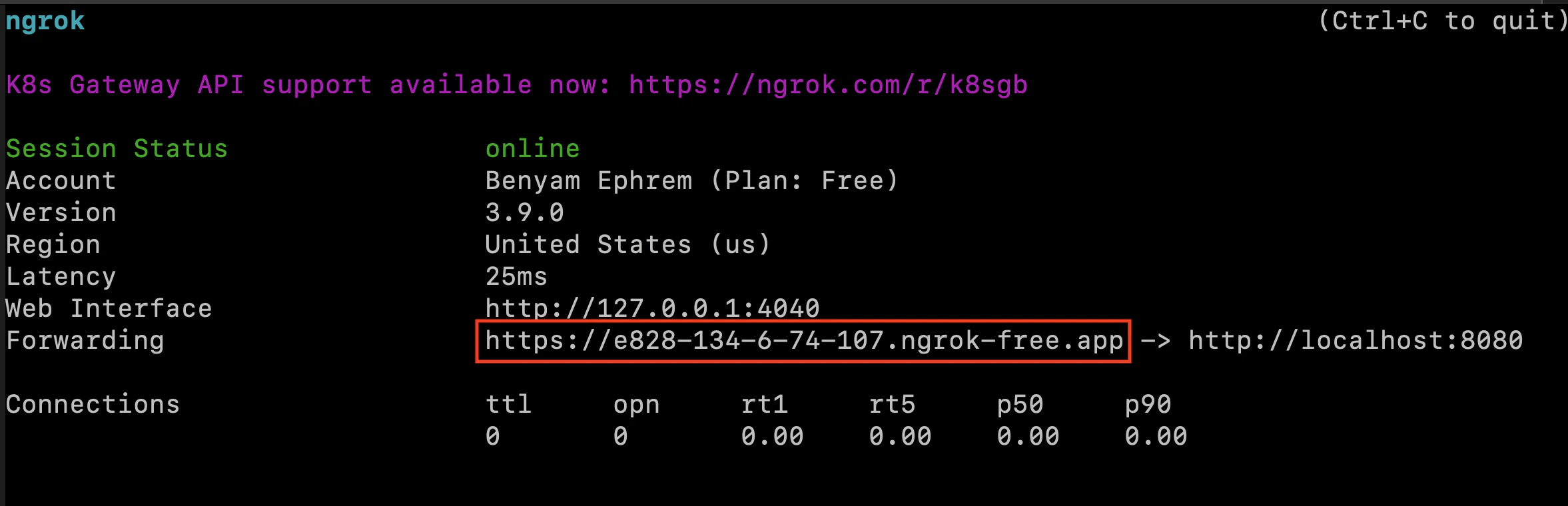 **Copy the ngrok URL**: You'll need the `https://abc123.ngrok.io` URL for the next step. This URL changes each time you restart ngrok (unless you have a paid plan with reserved domains).
## Step 5: Start Your Webhook Server
In your first terminal, start the Python webhook server:
```bash Flask Server theme={null}
python webhook_server.py
```
```bash Simple Server theme={null}
python simple_webhook_server.py
```
You should see output like:
```
🚀 Starting Interactly Webhook Test Server...
📡 Listening on port 5000
⚠️ No secret configured (set WEBHOOK_SECRET in .env)
🌐 Webhook endpoint: /webhook
============================================================
* Running on all addresses (0.0.0.0)
* Running on http://127.0.0.1:5000
* Running on http://[::1]:5000
```
## Step 6: Configure Interactly Assistant
Now configure your Interactly assistant to use your ngrok webhook URL:
### Via Dashboard UI
1. Go to your Interactly dashboard
2. Select your test assistant
3. Navigate to **Advanced Tab**
4. Scroll to **Server Configuration**
5. Fill in the webhook settings:
| Field | Value |
| -------- | ------------------------------------------------------------------- |
| URL | `https://your-ngrok-url.ngrok.io/webhook` |
| Secret | `your-webhook-secret-here` (if using) |
| Messages | Select events to test: `status-update`, `conversation-update`, etc. |
### Via API
```bash cURL theme={null}
curl -X PATCH "https://api.interactly.ai/assistants/YOUR_ASSISTANT_ID" \
-H "Authorization: Bearer YOUR_API_KEY" \
-H "Content-Type: application/json" \
-d '{
"assistantServer": {
"enabled": true,
"url": "https://your-ngrok-url.ngrok.io/webhook",
"timeoutSeconds": 20,
"secret": "your-webhook-secret-here",
"headers": {
"X-Test-Header": "webhook-testing"
},
"messages": [
"status-update",
"conversation-update",
"end-of-call-report",
"hang",
"error"
]
}
}'
```
```python Python theme={null}
import requests
assistant_id = "YOUR_ASSISTANT_ID"
api_key = "YOUR_API_KEY"
ngrok_url = "https://your-ngrok-url.ngrok.io"
data = {
"assistantServer": {
"enabled": True,
"url": f"{ngrok_url}/webhook",
"timeoutSeconds": 20,
"secret": "your-webhook-secret-here",
"messages": [
"status-update",
"conversation-update",
"end-of-call-report"
]
}
}
response = requests.patch(
f"https://api.interactly.ai/assistants/{assistant_id}",
headers={
"Authorization": f"Bearer {api_key}",
"Content-Type": "application/json"
},
json=data
)
print(f"Assistant updated: {response.status_code}")
```
## Step 7: Test Your Setup
### Test the Webhook Endpoint
First, verify your webhook endpoint is accessible:
```bash theme={null}
curl -X POST https://your-ngrok-url.ngrok.io/webhook \
-H "Content-Type: application/json" \
-d '{"test": "message"}'
```
### Start a Test Call
1. Go to your Interactly dashboard
2. Start a test call with your configured assistant
3. Speak a few messages
4. End the call
### Monitor the Logs
Watch your webhook server terminal for incoming events:
```
============================================================
[2026-03-05 14:23:15] WEBHOOK EVENT: status-update
============================================================
{
"message": {
"timestamp": 1772702523935,
"type": "status-update",
"call": {
"id": "WC-82015760-c3bd-427d-a23b-ba9b07e4ab85",
"status": "queued",
...
}
}
}
============================================================
📞 Call Status: QUEUED
```
## Advanced Testing Features
### Event Filtering and Analysis
Add custom filtering to focus on specific events:
```python theme={null}
# Add to webhook_server.py
FILTERED_EVENTS = ['conversation-update', 'end-of-call-report']
@app.route('/webhook', methods=['POST'])
def handle_webhook():
data = request.get_json()
event_type = data.get('message', {}).get('type')
# Skip filtered events
if FILTERED_EVENTS and event_type not in FILTERED_EVENTS:
return jsonify({'status': 'filtered'}), 200
# Process event...
```
### Save Events to File
Store webhook events for later analysis:
```python theme={null}
import json
from pathlib import Path
def save_event_to_file(event_type, data):
"""Save webhook events to JSON files"""
timestamp = datetime.now().strftime('%Y%m%d_%H%M%S')
filename = f"webhook_events/{event_type}_{timestamp}.json"
# Create directory if it doesn't exist
Path("webhook_events").mkdir(exist_ok=True)
with open(filename, 'w') as f:
json.dump(data, f, indent=2)
print(f"💾 Saved event to {filename}")
```
### Metrics Collection
Track webhook statistics:
```python theme={null}
from collections import defaultdict
class WebhookMetrics:
def __init__(self):
self.event_counts = defaultdict(int)
self.start_time = datetime.now()
def record_event(self, event_type):
self.event_counts[event_type] += 1
def get_stats(self):
uptime = datetime.now() - self.start_time
return {
'uptime_seconds': uptime.total_seconds(),
'events_received': dict(self.event_counts),
'total_events': sum(self.event_counts.values())
}
# Usage in webhook handler
metrics = WebhookMetrics()
@app.route('/metrics', methods=['GET'])
def get_metrics():
return jsonify(metrics.get_stats())
```
## Troubleshooting
### Common Issues
| Issue | Solution |
| -------------------------------- | ------------------------------------------------------- |
| **ngrok tunnel inactive** | Restart ngrok with `ngrok http 5000` |
| **Webhook not receiving events** | Check assistant configuration and ngrok URL |
| **Secret verification failed** | Ensure secret matches in both .env and assistant config |
| **JSON decode errors** | Verify Content-Type header and request format |
| **Port already in use** | Change PORT in .env or kill existing process |
### Debug Mode
Add debug logging to your webhook server:
```python theme={null}
import logging
logging.basicConfig(
level=logging.DEBUG,
format='%(asctime)s - %(levelname)s - %(message)s'
)
@app.route('/webhook', methods=['POST'])
def handle_webhook():
app.logger.debug(f"Headers: {dict(request.headers)}")
app.logger.debug(f"Body: {request.get_data()}")
# ... rest of handler
```
### ngrok Web Interface
Visit `http://localhost:4040` to see:
* Request/response logs
* Traffic inspection
* Tunnel status
* Error diagnostics
## Production Considerations
When moving from testing to production:
1. **Use HTTPS**: Always use HTTPS endpoints in production
2. **Implement Authentication**: Use webhook secrets and additional security
3. **Add Rate Limiting**: Protect against excessive webhook calls
4. **Error Handling**: Implement robust error handling and recovery
5. **Monitoring**: Add proper logging and alerting
6. **Idempotency**: Handle duplicate events gracefully
Once your local testing is working, deploy your webhook server to a production environment and update your assistant configuration with the production URL.
**Copy the ngrok URL**: You'll need the `https://abc123.ngrok.io` URL for the next step. This URL changes each time you restart ngrok (unless you have a paid plan with reserved domains).
## Step 5: Start Your Webhook Server
In your first terminal, start the Python webhook server:
```bash Flask Server theme={null}
python webhook_server.py
```
```bash Simple Server theme={null}
python simple_webhook_server.py
```
You should see output like:
```
🚀 Starting Interactly Webhook Test Server...
📡 Listening on port 5000
⚠️ No secret configured (set WEBHOOK_SECRET in .env)
🌐 Webhook endpoint: /webhook
============================================================
* Running on all addresses (0.0.0.0)
* Running on http://127.0.0.1:5000
* Running on http://[::1]:5000
```
## Step 6: Configure Interactly Assistant
Now configure your Interactly assistant to use your ngrok webhook URL:
### Via Dashboard UI
1. Go to your Interactly dashboard
2. Select your test assistant
3. Navigate to **Advanced Tab**
4. Scroll to **Server Configuration**
5. Fill in the webhook settings:
| Field | Value |
| -------- | ------------------------------------------------------------------- |
| URL | `https://your-ngrok-url.ngrok.io/webhook` |
| Secret | `your-webhook-secret-here` (if using) |
| Messages | Select events to test: `status-update`, `conversation-update`, etc. |
### Via API
```bash cURL theme={null}
curl -X PATCH "https://api.interactly.ai/assistants/YOUR_ASSISTANT_ID" \
-H "Authorization: Bearer YOUR_API_KEY" \
-H "Content-Type: application/json" \
-d '{
"assistantServer": {
"enabled": true,
"url": "https://your-ngrok-url.ngrok.io/webhook",
"timeoutSeconds": 20,
"secret": "your-webhook-secret-here",
"headers": {
"X-Test-Header": "webhook-testing"
},
"messages": [
"status-update",
"conversation-update",
"end-of-call-report",
"hang",
"error"
]
}
}'
```
```python Python theme={null}
import requests
assistant_id = "YOUR_ASSISTANT_ID"
api_key = "YOUR_API_KEY"
ngrok_url = "https://your-ngrok-url.ngrok.io"
data = {
"assistantServer": {
"enabled": True,
"url": f"{ngrok_url}/webhook",
"timeoutSeconds": 20,
"secret": "your-webhook-secret-here",
"messages": [
"status-update",
"conversation-update",
"end-of-call-report"
]
}
}
response = requests.patch(
f"https://api.interactly.ai/assistants/{assistant_id}",
headers={
"Authorization": f"Bearer {api_key}",
"Content-Type": "application/json"
},
json=data
)
print(f"Assistant updated: {response.status_code}")
```
## Step 7: Test Your Setup
### Test the Webhook Endpoint
First, verify your webhook endpoint is accessible:
```bash theme={null}
curl -X POST https://your-ngrok-url.ngrok.io/webhook \
-H "Content-Type: application/json" \
-d '{"test": "message"}'
```
### Start a Test Call
1. Go to your Interactly dashboard
2. Start a test call with your configured assistant
3. Speak a few messages
4. End the call
### Monitor the Logs
Watch your webhook server terminal for incoming events:
```
============================================================
[2026-03-05 14:23:15] WEBHOOK EVENT: status-update
============================================================
{
"message": {
"timestamp": 1772702523935,
"type": "status-update",
"call": {
"id": "WC-82015760-c3bd-427d-a23b-ba9b07e4ab85",
"status": "queued",
...
}
}
}
============================================================
📞 Call Status: QUEUED
```
## Advanced Testing Features
### Event Filtering and Analysis
Add custom filtering to focus on specific events:
```python theme={null}
# Add to webhook_server.py
FILTERED_EVENTS = ['conversation-update', 'end-of-call-report']
@app.route('/webhook', methods=['POST'])
def handle_webhook():
data = request.get_json()
event_type = data.get('message', {}).get('type')
# Skip filtered events
if FILTERED_EVENTS and event_type not in FILTERED_EVENTS:
return jsonify({'status': 'filtered'}), 200
# Process event...
```
### Save Events to File
Store webhook events for later analysis:
```python theme={null}
import json
from pathlib import Path
def save_event_to_file(event_type, data):
"""Save webhook events to JSON files"""
timestamp = datetime.now().strftime('%Y%m%d_%H%M%S')
filename = f"webhook_events/{event_type}_{timestamp}.json"
# Create directory if it doesn't exist
Path("webhook_events").mkdir(exist_ok=True)
with open(filename, 'w') as f:
json.dump(data, f, indent=2)
print(f"💾 Saved event to {filename}")
```
### Metrics Collection
Track webhook statistics:
```python theme={null}
from collections import defaultdict
class WebhookMetrics:
def __init__(self):
self.event_counts = defaultdict(int)
self.start_time = datetime.now()
def record_event(self, event_type):
self.event_counts[event_type] += 1
def get_stats(self):
uptime = datetime.now() - self.start_time
return {
'uptime_seconds': uptime.total_seconds(),
'events_received': dict(self.event_counts),
'total_events': sum(self.event_counts.values())
}
# Usage in webhook handler
metrics = WebhookMetrics()
@app.route('/metrics', methods=['GET'])
def get_metrics():
return jsonify(metrics.get_stats())
```
## Troubleshooting
### Common Issues
| Issue | Solution |
| -------------------------------- | ------------------------------------------------------- |
| **ngrok tunnel inactive** | Restart ngrok with `ngrok http 5000` |
| **Webhook not receiving events** | Check assistant configuration and ngrok URL |
| **Secret verification failed** | Ensure secret matches in both .env and assistant config |
| **JSON decode errors** | Verify Content-Type header and request format |
| **Port already in use** | Change PORT in .env or kill existing process |
### Debug Mode
Add debug logging to your webhook server:
```python theme={null}
import logging
logging.basicConfig(
level=logging.DEBUG,
format='%(asctime)s - %(levelname)s - %(message)s'
)
@app.route('/webhook', methods=['POST'])
def handle_webhook():
app.logger.debug(f"Headers: {dict(request.headers)}")
app.logger.debug(f"Body: {request.get_data()}")
# ... rest of handler
```
### ngrok Web Interface
Visit `http://localhost:4040` to see:
* Request/response logs
* Traffic inspection
* Tunnel status
* Error diagnostics
## Production Considerations
When moving from testing to production:
1. **Use HTTPS**: Always use HTTPS endpoints in production
2. **Implement Authentication**: Use webhook secrets and additional security
3. **Add Rate Limiting**: Protect against excessive webhook calls
4. **Error Handling**: Implement robust error handling and recovery
5. **Monitoring**: Add proper logging and alerting
6. **Idempotency**: Handle duplicate events gracefully
Once your local testing is working, deploy your webhook server to a production environment and update your assistant configuration with the production URL.