> ## Documentation Index
> Fetch the complete documentation index at: https://docs.interactly.ai/llms.txt
> Use this file to discover all available pages before exploring further.
# Live Events Dashboard
> Build a real-time webhook events dashboard to capture and visualize live call messages
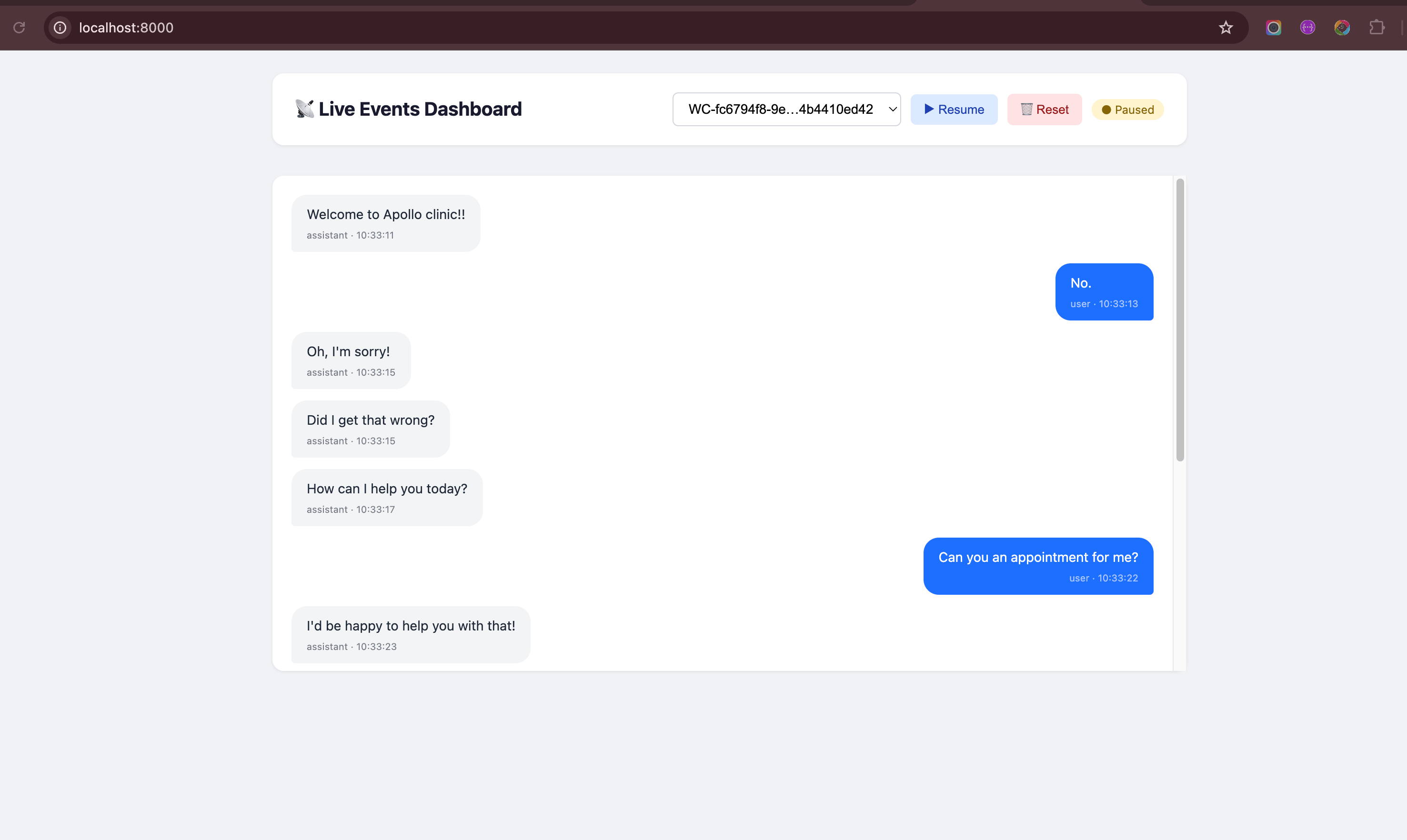
Go beyond terminal logs — build a **live events dashboard** that captures webhook events in real time and displays conversation messages in a chat-like UI you can monitor from your browser.
This guide builds on the [ngrok setup](/webhooks/events/testing/ngrok-setup). Make sure you have ngrok installed and authenticated before proceeding.
## What You'll Build
```mermaid theme={null}
graph LR
A[Interactly] -->|Webhook POST| B[ngrok Tunnel]
B --> C[FastAPI Server]
C -->|Store Events| D[In-Memory Store]
D -->|Poll Every 1s| E[Live Dashboard]
```
A FastAPI-powered webhook receiver that:
Receives and stores `status-update` and `conversation-update` events per call in memory
Renders user and assistant messages in a real-time chat bubble interface
Tracks multiple simultaneous calls with a conversation selector dropdown
Polls the server every second and auto-scrolls to the latest messages
## Prerequisites
* Python 3.8+
* ngrok installed and authenticated
* An Interactly assistant with webhooks enabled
## Architecture Overview
The system has two parts:
A Python server that accepts incoming webhook POST requests, parses `status-update` and `conversation-update` events, deduplicates messages, and exposes REST endpoints to query stored data.
A single-page HTML file served by the same FastAPI server. It polls the backend every few seconds, lets you pick a conversation, and renders messages in a chat-style layout with auto-refresh.
***
## Step 1: Install Dependencies
```bash theme={null}
mkdir interactly-live-events && cd interactly-live-events
python3 -m venv venv
source venv/bin/activate # Windows: venv\Scripts\activate
pip3 install fastapi uvicorn
```
We only need **FastAPI** and **Uvicorn** — no database, no extra libraries. Events are stored in memory for simplicity.
## Step 2: Create the Webhook Server
Create `server.py` — this is the core of the live events system:
```python server.py theme={null}
from datetime import datetime
import os
from fastapi import FastAPI, Body, Request
from fastapi.responses import JSONResponse, HTMLResponse
app = FastAPI(title="Interactly Live Events")
# ── In-memory event store ──────────────────────────────────
# Structure per conversation:
# {
# "call-id-1": {
# "statuses": [{"status": "queued", "timestamp": 17725...}],
# "messages": [{"messageId": "msg-1", "role": "user", "text": "Hi", "timestamp": 17725...}],
# "events": []
# }
# }
event_store: dict = {}
# ── Helpers ─────────────────────────────────────────────────
def ts_label(timestamp_ms: int) -> str:
"""Convert epoch-ms to HH:MM:SS.mmm for logging."""
dt = datetime.fromtimestamp(timestamp_ms / 1000.0)
return dt.strftime("%H:%M:%S.%f")[:-3]
def ensure_conversation(call_id: str):
"""Initialise the store entry for a new call if it doesn't exist."""
if call_id not in event_store:
event_store[call_id] = {"statuses": [], "messages": [], "events": []}
# ── Event parsers ───────────────────────────────────────────
def handle_status_update(event: dict):
"""Extract status from a status-update webhook and store it."""
msg = event.get("message", {})
call = msg.get("call", {})
call_id = call.get("id")
if not call_id:
return
ensure_conversation(call_id)
status = call.get("status", "unknown")
timestamp = msg.get("timestamp", 0)
event_store[call_id]["statuses"].append(
{"status": status, "timestamp": timestamp}
)
print(f"[{ts_label(timestamp)}] 📞 {call_id[:12]}… → {status.upper()}")
def handle_conversation_update(event: dict):
"""Extract new messages from a conversation-update webhook, deduplicating by messageId."""
msg = event.get("message", {})
call_id = msg.get("call", {}).get("id")
if not call_id:
return
ensure_conversation(call_id)
existing_ids = {m["messageId"] for m in event_store[call_id]["messages"]}
for m in msg.get("messages", []):
mid = m.get("messageId")
if mid and mid not in existing_ids:
entry = {
"messageId": mid,
"role": m.get("role", "unknown"),
"text": m.get("text", ""),
"timestamp": m.get("timestamp", 0),
}
event_store[call_id]["messages"].append(entry)
existing_ids.add(mid)
print(f"[{ts_label(entry['timestamp'])}] 💬 {entry['role']}: {entry['text'][:80]}")
# ── Routes: Webhook receiver ───────────────────────────────
@app.post("/webhook")
async def receive_webhook(event: dict = Body(...)):
"""
Main webhook endpoint — Interactly sends events here.
Dispatches to the appropriate handler based on event type.
"""
msg = event.get("message", {})
event_type = msg.get("type", "")
call_id = msg.get("call", {}).get("id")
if call_id:
ensure_conversation(call_id)
event_store[call_id]["events"].append(event)
if event_type == "status-update":
handle_status_update(event)
elif event_type == "conversation-update":
handle_conversation_update(event)
else:
print(f"ℹ️ Received event type: {event_type}")
return JSONResponse({"status": "ok"})
# ── Routes: Dashboard API ──────────────────────────────────
@app.get("/api/conversations")
async def list_conversations():
"""Return all conversation IDs and their stored data."""
return JSONResponse({"conversations": event_store})
@app.get("/api/conversations/{call_id}")
async def get_conversation(call_id: str):
"""Return statuses + messages for a single conversation."""
convo = event_store.get(call_id)
if not convo:
return JSONResponse({"error": "Not found"}, status_code=404)
return JSONResponse(convo)
@app.delete("/api/conversations")
async def clear_all():
"""Wipe all stored events (useful during development)."""
event_store.clear()
return JSONResponse({"message": "All events cleared"})
# ── Routes: Serve the dashboard HTML ───────────────────────
@app.get("/", response_class=HTMLResponse)
async def dashboard():
"""Serve the live events dashboard."""
html_path = os.path.join(os.path.dirname(__file__), "dashboard.html")
with open(html_path) as f:
return HTMLResponse(f.read())
# ── Entrypoint ─────────────────────────────────────────────
if __name__ == "__main__":
import uvicorn
PORT = int(os.environ.get("PORT", 8000))
print(f"🚀 Live Events Server starting on port {PORT}")
print(f"📡 Webhook endpoint : http://localhost:{PORT}/webhook")
print(f"🖥️ Dashboard : http://localhost:{PORT}/")
uvicorn.run(app, host="0.0.0.0", port=PORT)
```
### How the server works
`event_store` is a plain Python dict keyed by **call ID**. Each entry holds three lists — `statuses`, `messages`, and raw `events`. No database setup required; data resets when you restart the server.
Interactly sends **all** messages accumulated so far with every `conversation-update` event. The server tracks seen `messageId` values in a set and only appends genuinely new messages — so your dashboard never shows duplicates.
The same FastAPI instance serves the webhook endpoint (`POST /webhook`), the REST API (`GET /api/conversations`), **and** the HTML dashboard (`GET /`). One process, one port — no CORS issues.
## Step 3: Create the Live Dashboard
Create `dashboard.html` in the same directory as `server.py`:
```html dashboard.html theme={null}
Interactly — Live Events
📡 Live Events Dashboard
● Live
Make a call — messages will appear here in real time.
```
### Dashboard features at a glance
The dashboard polls `/api/conversations` every 1.5 seconds. When a new call ID appears, it's added to the dropdown and auto-selected so you see messages immediately — no manual refresh needed.
User messages appear on the right (blue bubbles), assistant messages on the left (grey bubbles), exactly like a messaging app. Each bubble shows the role and timestamp.
Call status transitions (`queued → ongoing → finished`) are displayed as pills above the chat area, giving you a quick timeline of the call lifecycle.
**Pause** stops polling without losing data. **Resume** picks back up instantly. **Reset** clears all stored events on the server — handy between test runs.
## Step 4: Start Everything
You need **two terminals** — one for the server, one for ngrok.
```bash theme={null}
cd interactly-live-events
source venv/bin/activate
python3 server.py
```
Expected output:
```
🚀 Live Events Server starting on port 8000
📡 Webhook endpoint : http://localhost:8000/webhook
🖥️ Dashboard : http://localhost:8000/
INFO: Uvicorn running on http://0.0.0.0:8000
```
```bash theme={null}
ngrok http 8000
```
Copy the **Forwarding** URL (e.g. `https://a1b2c3d4.ngrok.io`).
The ngrok URL changes every time you restart ngrok (unless you have a paid plan with a reserved domain). Remember to update your assistant's webhook URL each time.
## Step 5: Configure Your Assistant
Point your Interactly assistant's webhook to the ngrok URL with `/webhook` appended.
Go to **Interactly Dashboard → Clinical Assistants → Your Assistant → Advanced Tab**
Toggle webhooks **on**, and set the URL to:
```
https://YOUR-NGROK-URL.ngrok.io/webhook
```
Under **Server Messages**, enable at least:
* `status-update`
* `conversation-update`
Click **Update Assistant** to apply.
```bash theme={null}
curl -X PATCH "https://api.interactly.ai/assistants/YOUR_ASSISTANT_ID" \
-H "Authorization: Bearer YOUR_API_KEY" \
-H "Content-Type: application/json" \
-d '{
"assistantServer": {
"enabled": true,
"url": "https://YOUR-NGROK-URL.ngrok.io/webhook",
"timeoutSeconds": 20,
"messages": ["status-update", "conversation-update", "end-of-call-report"]
}
}'
```
```python theme={null}
import requests
requests.patch(
"https://api.interactly.ai/assistants/YOUR_ASSISTANT_ID",
headers={"Authorization": "Bearer YOUR_API_KEY"},
json={
"assistantServer": {
"enabled": True,
"url": "https://YOUR-NGROK-URL.ngrok.io/webhook",
"timeoutSeconds": 20,
"messages": ["status-update", "conversation-update", "end-of-call-report"],
}
},
)
```
## Step 6: Make a Test Call
Navigate to `http://localhost:8000` in your browser.
Go to your Interactly dashboard and initiate a test call with the configured assistant.
The dashboard will auto-detect the new call. Status pills appear first (`queued → ongoing`), then messages stream in as the conversation progresses.
When the call ends, you'll see the `finished` status pill. All messages remain visible for review.
You should see live output in **both** places:
```
[14:23:15.935] 📞 WC-82015760…07e4ab85 → QUEUED
[14:23:17.112] 📞 WC-82015760…07e4ab85 → ONGOING
[14:23:19.445] 💬 assistant: Hello! How can I help you today?
[14:23:24.891] 💬 user: I'd like to schedule an appointment
[14:23:26.334] 💬 assistant: Sure! What date works best for you?
[14:24:01.220] 📞 WC-82015760…07e4ab85 → FINISHED
```
The chat area fills with blue (user) and grey (assistant) bubbles in real time, with status pills showing `queued → ongoing → finished` across the top.
## Project Structure
After completing all steps, your directory should look like:
```
interactly-live-events/
├── venv/
├── server.py # FastAPI webhook server + REST API
└── dashboard.html # Live events dashboard UI
```
That's it — just **two files** and a virtual environment.
## Troubleshooting
Open browser DevTools → Console. If you see CORS or fetch errors, make sure you're accessing the dashboard via `http://localhost:8000` (served by FastAPI), not by opening the HTML file directly.
Restart ngrok (`ngrok http 8000`), copy the new Forwarding URL, and update your assistant's webhook URL. The server itself doesn't need restarting.
This shouldn't happen — the server deduplicates by `messageId`. If it does, restart the server (`Ctrl+C` then `python server.py`) to clear the in-memory store, or click **Reset** in the dashboard.
Either kill the existing process (`lsof -i :8000` then `kill `), or start on a different port:
```bash theme={null}
PORT=9000 python server.py
ngrok http 9000
```
## Next Steps
Learn about all 5 webhook event types and their payload structures
Detailed ngrok configuration including custom domains and auth tokens
 ## Prerequisites
* Python 3.8+
* ngrok installed and authenticated
* An Interactly assistant with webhooks enabled
## Architecture Overview
The system has two parts:
## Prerequisites
* Python 3.8+
* ngrok installed and authenticated
* An Interactly assistant with webhooks enabled
## Architecture Overview
The system has two parts: